Aggregate Operations
An aggregate operation turns a whole collection into one value. Examples are the number of elements, their sum, the biggest element, or all elements combined into one result.
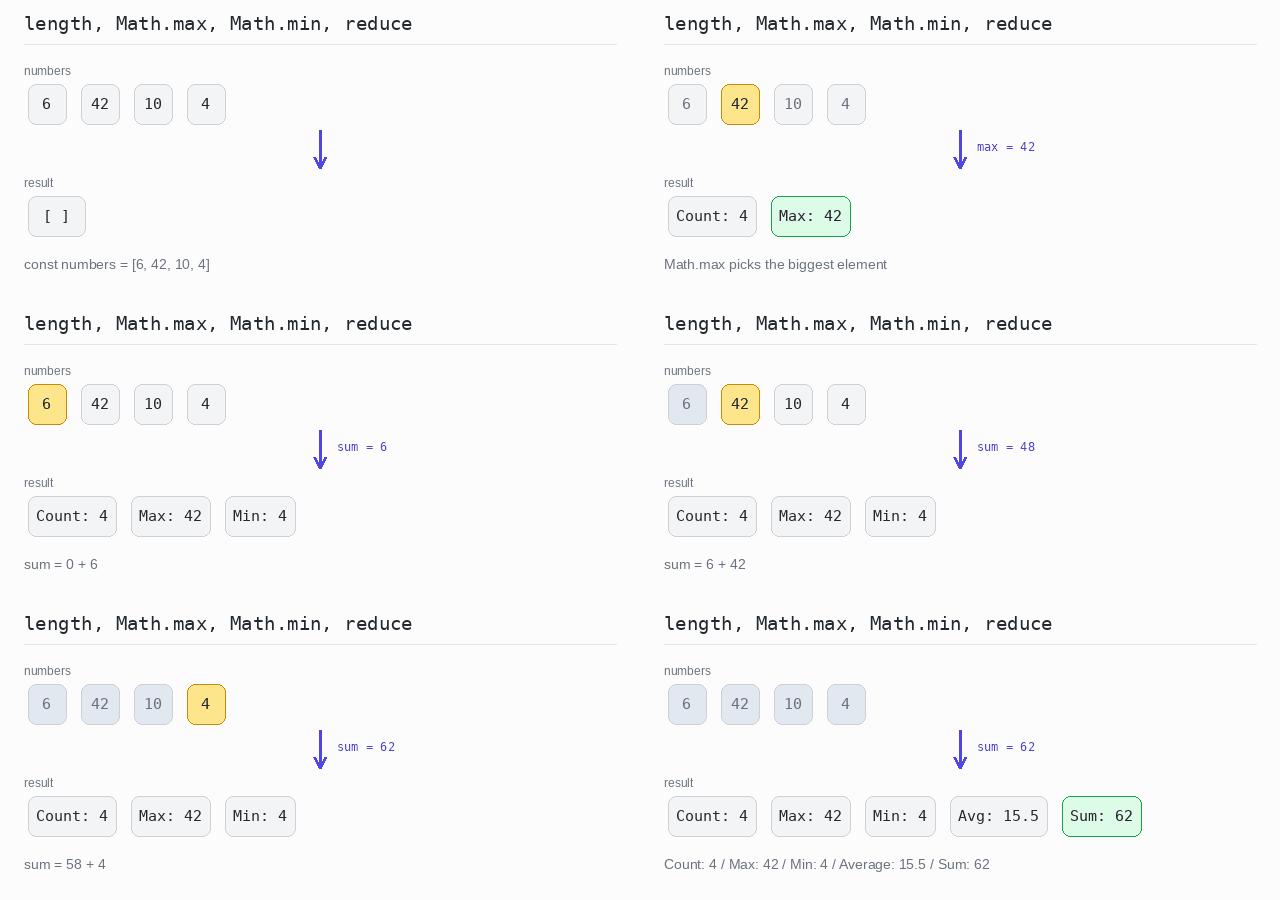
Arrays give you some of these directly. numbers.length counts the elements. Math.max() and Math.min() find the biggest and the smallest number; you hand them the elements with Math.max(...numbers). For a sum or an average there is no method: you combine the elements with reduce().
Be careful with empty arrays. Math.max() with no values returns -Infinity and Math.min() returns Infinity, so check numbers.length > 0 when the array might be empty.
Many languages have separate fold and reduce methods for combining elements one by one. Here both are the same method, reduce(), and the difference is only whether you pass an initial value. reduceRight() does the same walk from the last element to the first.
Basic Aggregates
The most common aggregates are count, minimum, maximum, sum and average.
numbers.lengthgives the count.Math.max(...numbers)andMath.min(...numbers)give the biggest and the smallest number. They work for numbers only.- The sum is a
reduce()that adds every element to a running total. The average is the sum divided by the count; the division keeps the decimal part, so62 / 4is15.5.
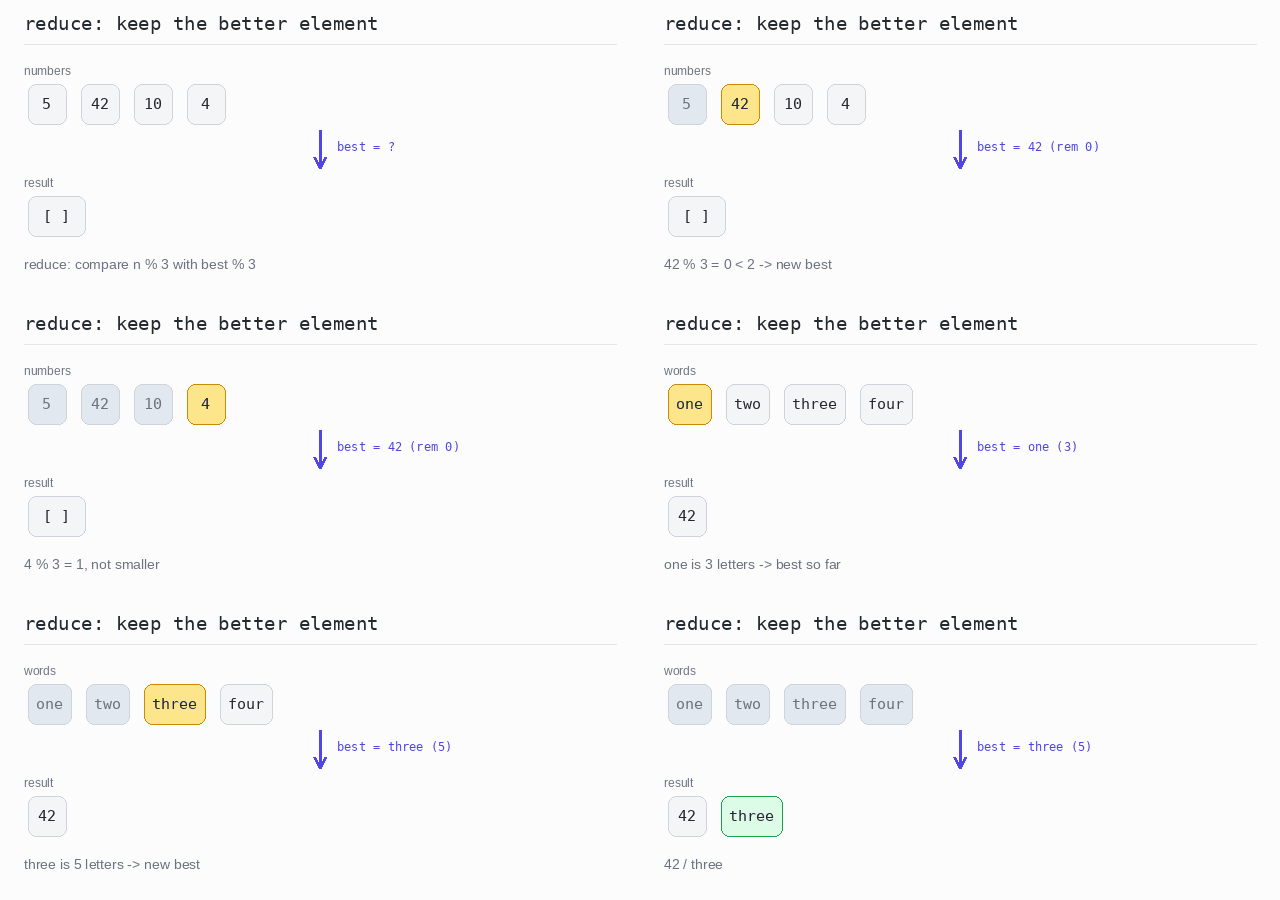
Sometimes the smallest or biggest element should be picked by a rule, not by the value itself. reduce() does that too: in every step you keep the better of the two elements. This also works for words and objects, where Math.min() cannot help.
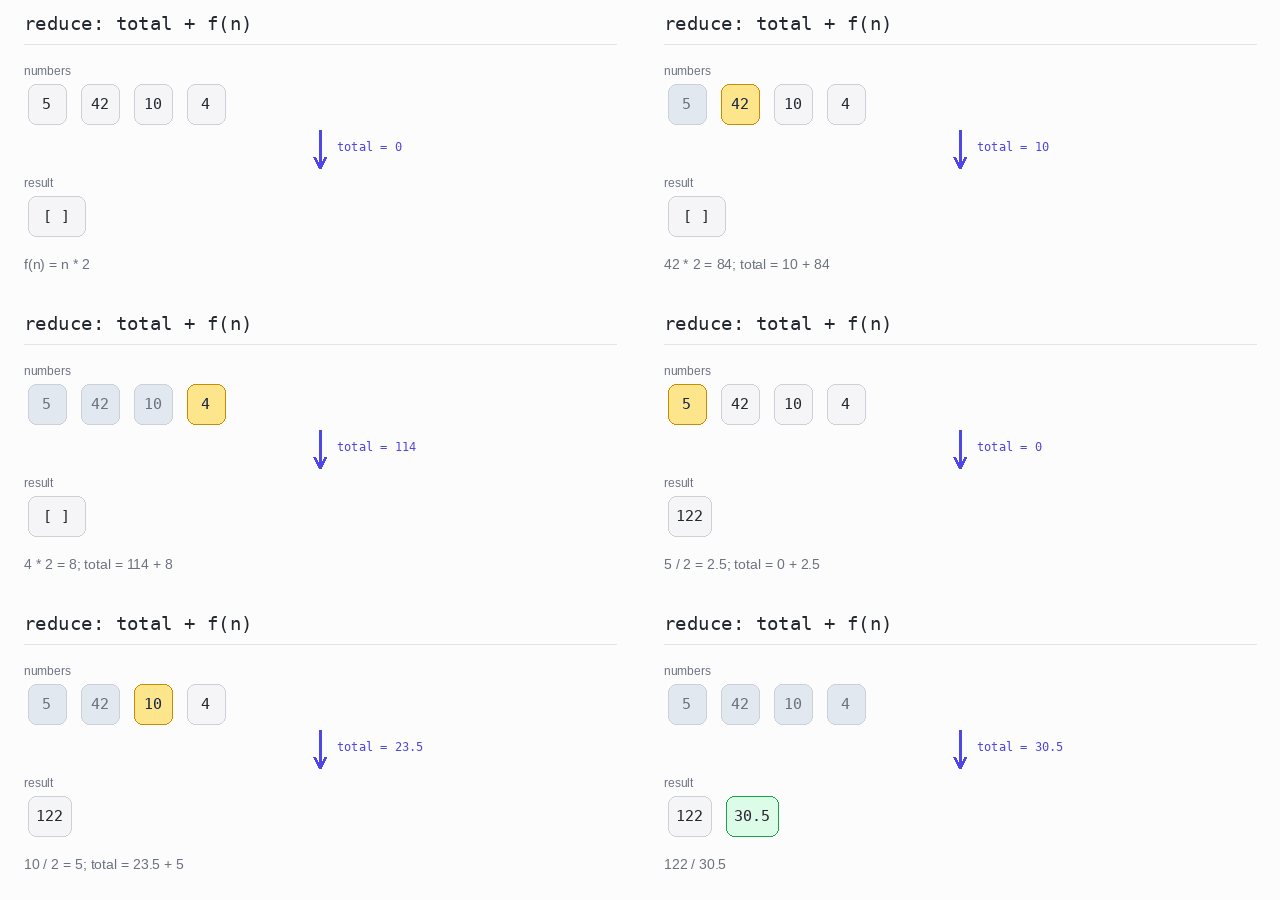
Sometimes every element must be turned into a number first and the results added up. That is one reduce() as well: add the computed value instead of the element itself.
Count, min, max, sum and average
For the numbers 6, 42, 10 and 4 the program prints the count with length, the biggest and the smallest with Math.max() and Math.min(), and the sum from a reduce(). The average is 62 / 4 = 15.5.
Output: TypeScript file and captured output
const numbers = [6, 42, 10, 4]

// there is no sum() method: reduce() adds the elements up
const sum = numbers.reduce((total, n) => total + n, 0)

console.log('Count:', numbers.length)
console.log('Max:', Math.max(...numbers))
console.log('Min:', Math.min(...numbers))
console.log('Average:', sum / numbers.length)
console.log('Sum:', sum)
Min and max by a rule
The first reduce() keeps the element with the smaller remainder after dividing by 3. The remainders of 5, 42, 10 and 4 are 2, 0, 1 and 1, so 42 wins. The second one keeps the longer word and finds "three".
Output: TypeScript file and captured output
const numbers = [5, 42, 10, 4]
const words = ['one', 'two', 'three', 'four']

// the element whose remainder after dividing by 3 is the smallest
const minRemainder = numbers.reduce((best, n) => (n % 3 < best % 3 ? n : best))

console.log(minRemainder)

// the longest word, compared by length
const longest = words.reduce((best, word) => (word.length > best.length ? word : best))

console.log(longest)
Sum of a function of each element
The callback adds a computed value to the total instead of the element itself. Doubling 5, 42, 10 and 4 gives 122. Halving them gives 30.5, because the division keeps the decimal part.
Output: TypeScript file and captured output
const numbers = [5, 42, 10, 4]

// reduce() adds up a value that is computed from each element
console.log(numbers.reduce((total, n) => total + n * 2, 0))
console.log(numbers.reduce((total, n) => total + n / 2, 0))
Fold and Reduce
Fold and reduce combine all elements into one value, step by step. They keep a running value called the accumulator. For each element they call a function with the accumulator and the element, and the function returns the new accumulator.
Both are the same method here. The difference is the second argument of reduce():
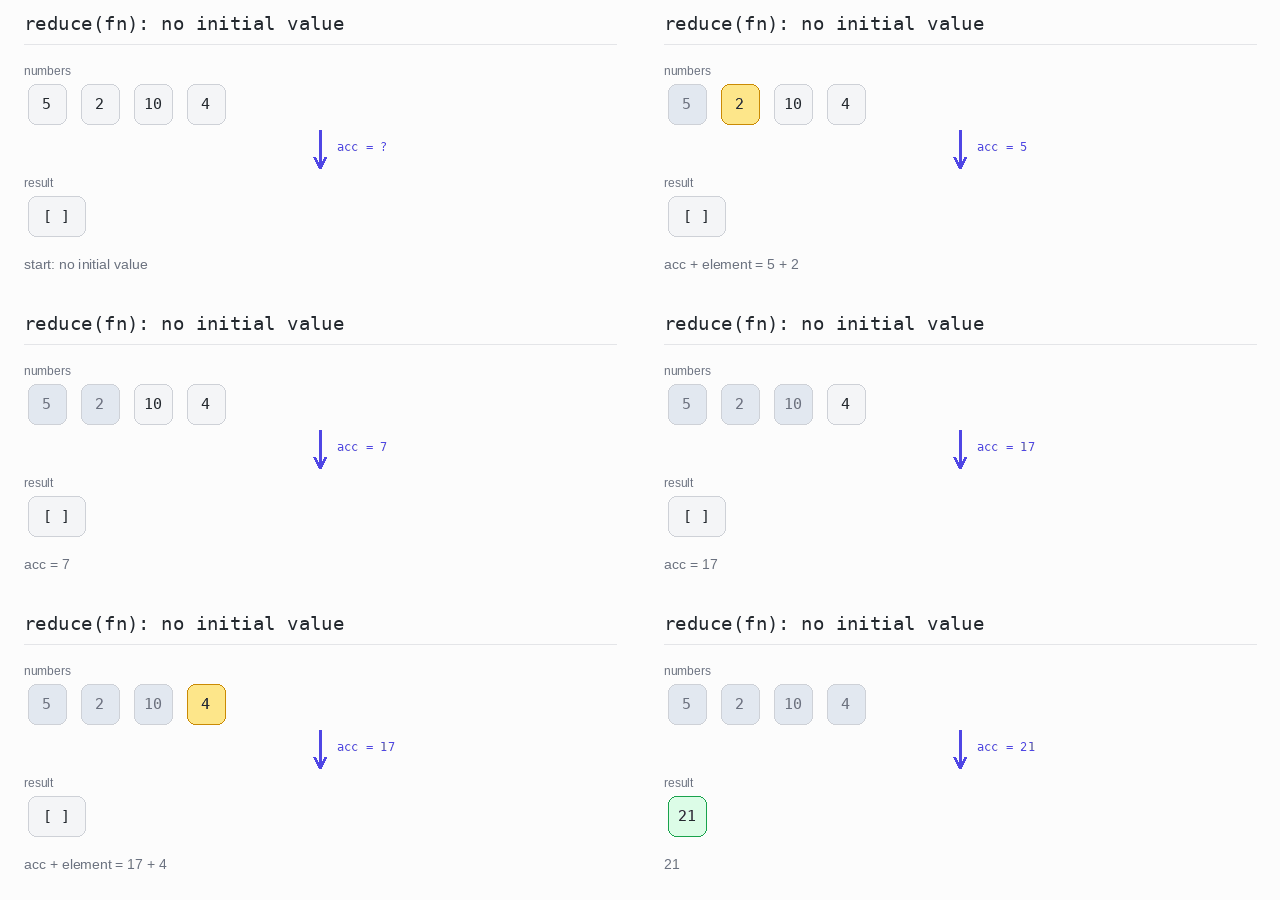
reduce(fn, initial)is a fold. It starts with the initial value you give it, so the function runs once for every element.reduce(fn)is a reduce. It starts with the first element, so the function runs from the second element onward and the first element never goes through it.
This matters when the function changes the element. If it doubles every element, reduce(fn) leaves the first element as it is.
It matters for empty arrays too. reduce(fn, initial) simply returns the initial value, while reduce(fn) has nothing to start with and throws a TypeError.
To combine from the other end, use reduceRight(): the same method, walking from the last element to the first.
Reduce
reduce() with no initial value takes 5 as the start and adds 2, 10 and 4 to it, so the result is 21. The same call on an empty array throws, and the program prints the message it carries: Reduce of empty array with no initial value.
Output: TypeScript file and captured output
const numbers = [5, 2, 10, 4]

// with no initial value reduce() starts with the first element
const sum = numbers.reduce((acc, element) => acc + element)

console.log(sum)

// an empty array has no first element to start with
const empty: number[] = []

try {
  empty.reduce((acc, element) => acc + element)
} catch (error) {
  console.log((error as Error).message)
}
Fold
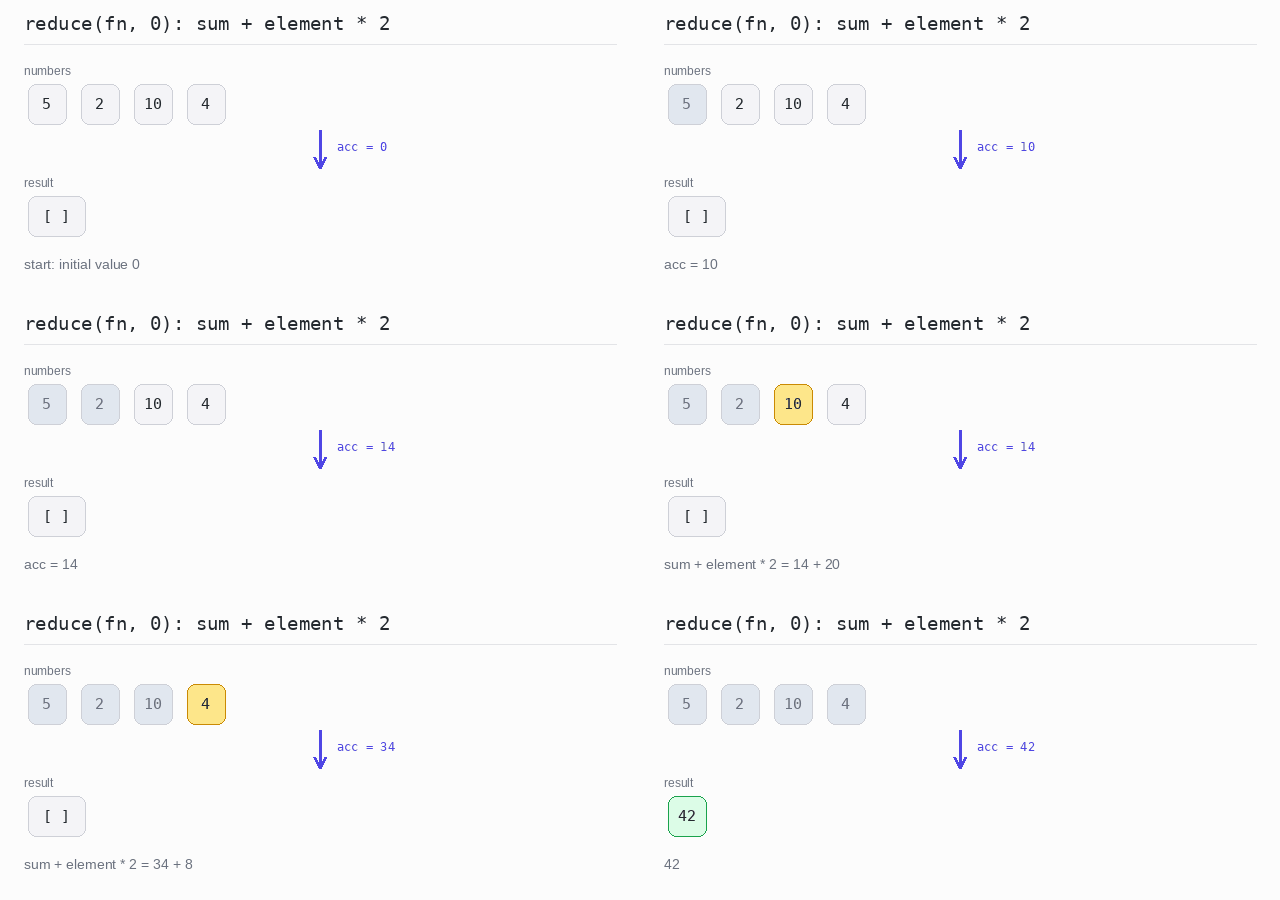
Here reduce() gets the initial value 0 and adds each element times 2. Every element is doubled: 10 + 4 + 20 + 8 = 42.
Output: TypeScript file and captured output
const numbers = [5, 2, 10, 4]

// the second argument is the initial value, so every element goes through the function
const sumDoubled = numbers.reduce((sum, element) => sum + element * 2, 0)

console.log(sumDoubled)
Fold versus Reduce
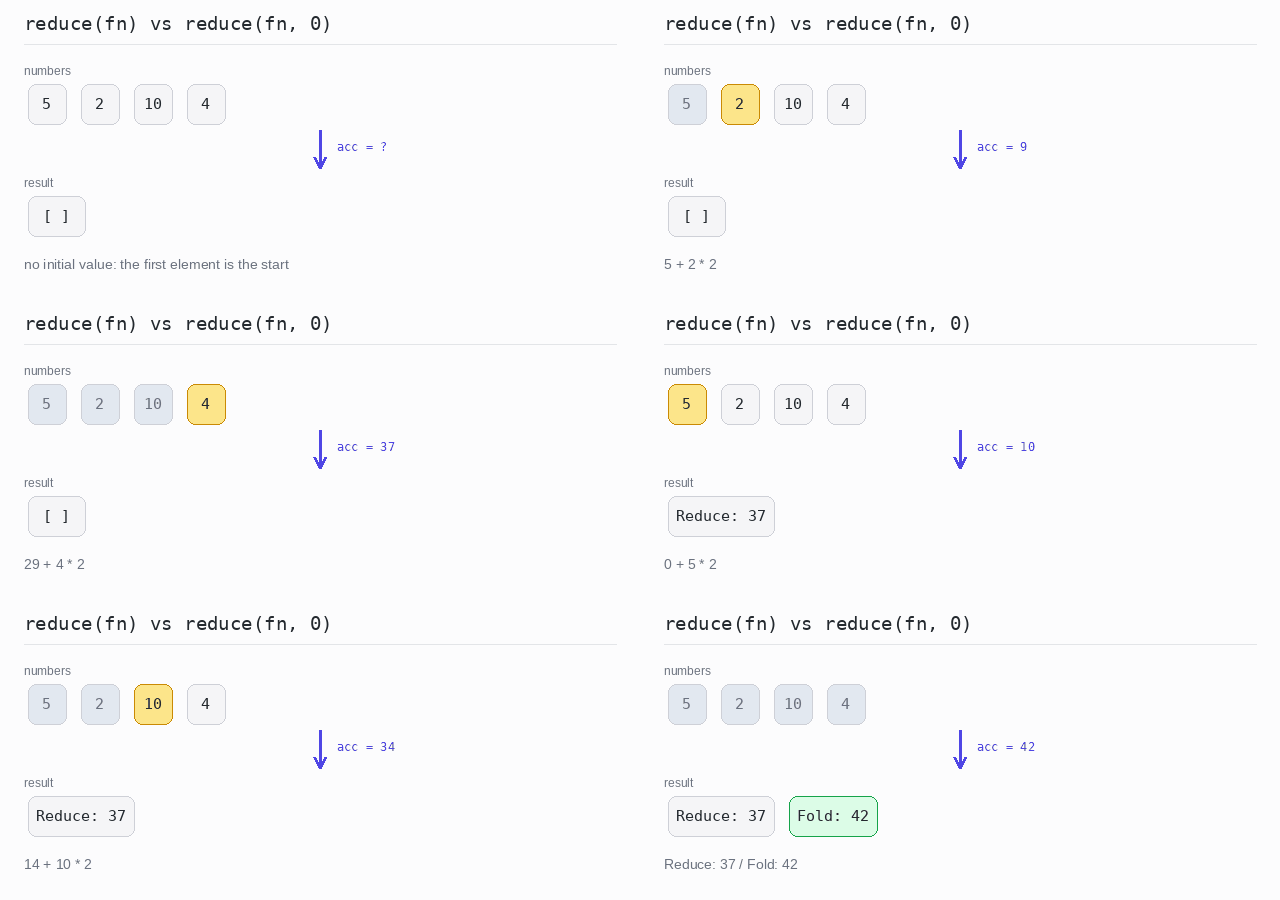
Both calls use the same function, sum plus element times 2. Without an initial value the result is 37, because the first element 5 is the start and is not doubled. With the initial value 0 the result is 42.
Output: TypeScript file and captured output
const numbers = [5, 2, 10, 4]

// no initial value: 5 is the start and is never doubled, so 5 + 4 + 20 + 8
const reduced = numbers.reduce((sum, element) => sum + element * 2)

console.log('Reduce:', reduced)

// initial value 0: every element is doubled, so 10 + 4 + 20 + 8
const folded = numbers.reduce((sum, element) => sum + element * 2, 0)

console.log('Fold:', folded)
Fold from the right
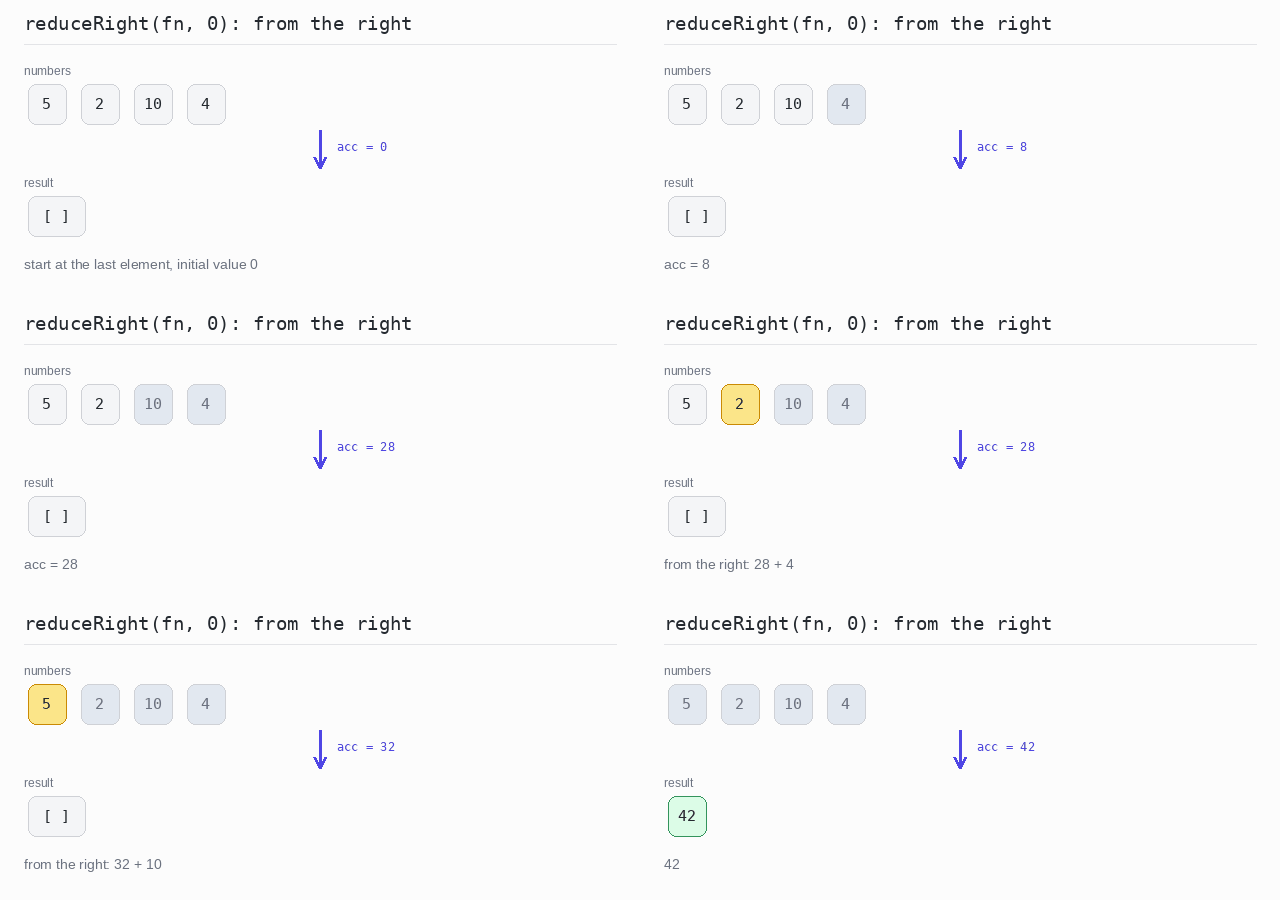
reduceRight() walks the array from the last element to the first. Addition does not care about the order, so the result is again 42.
Output: TypeScript file and captured output
const numbers = [5, 2, 10, 4]

// reduceRight() walks the array from the last element to the first
const sumDoubledRight = numbers.reduceRight((sum, element) => sum + element * 2, 0)

console.log(sumDoubledRight)
Fold with Index
Sometimes the position of an element matters, not only its value.
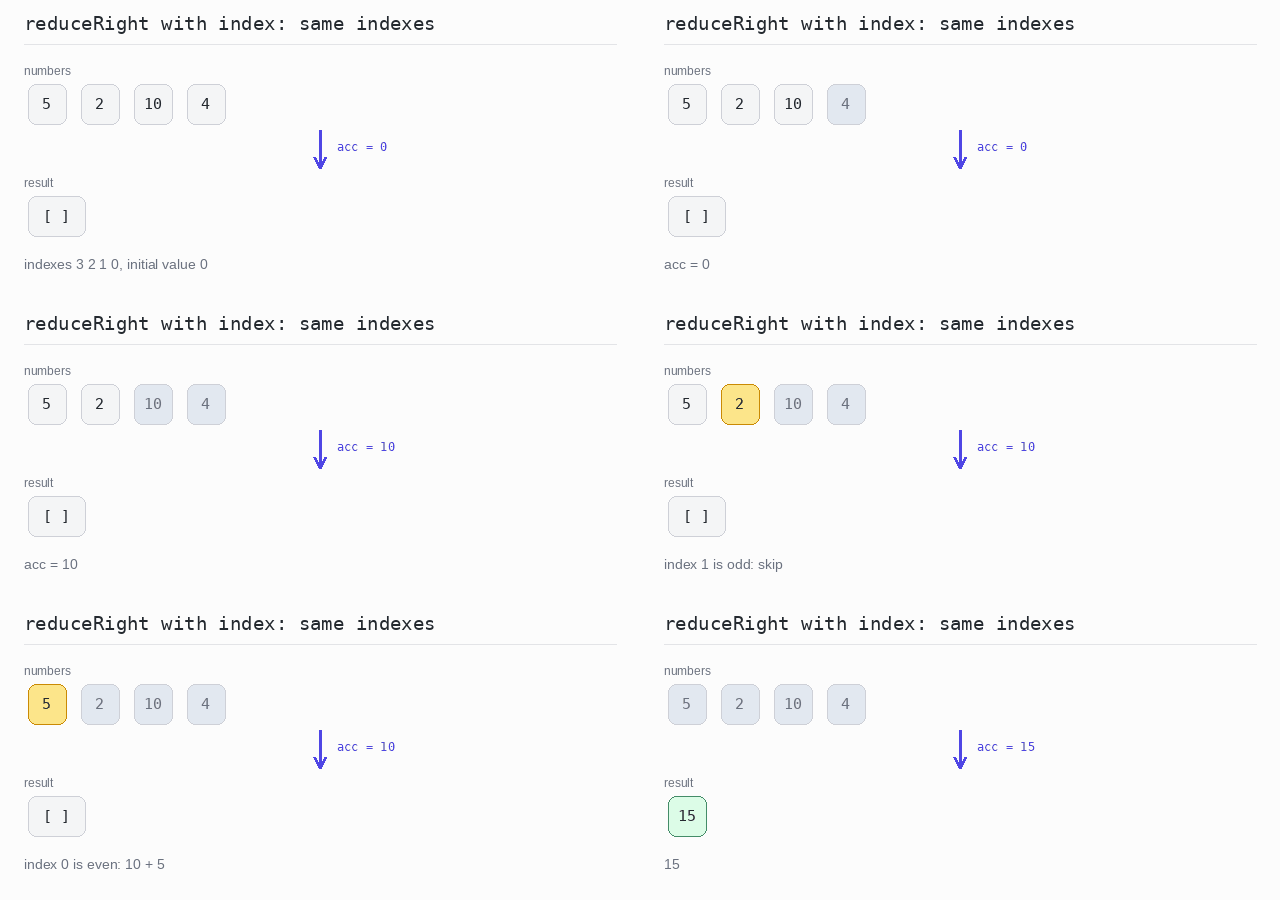
The callback of reduce() gets the index as its third argument, after the accumulator and the element. A condition on that index then decides what to do with the element. reduceRight() hands over the same indexes; it only visits them from the end.
Fold with index
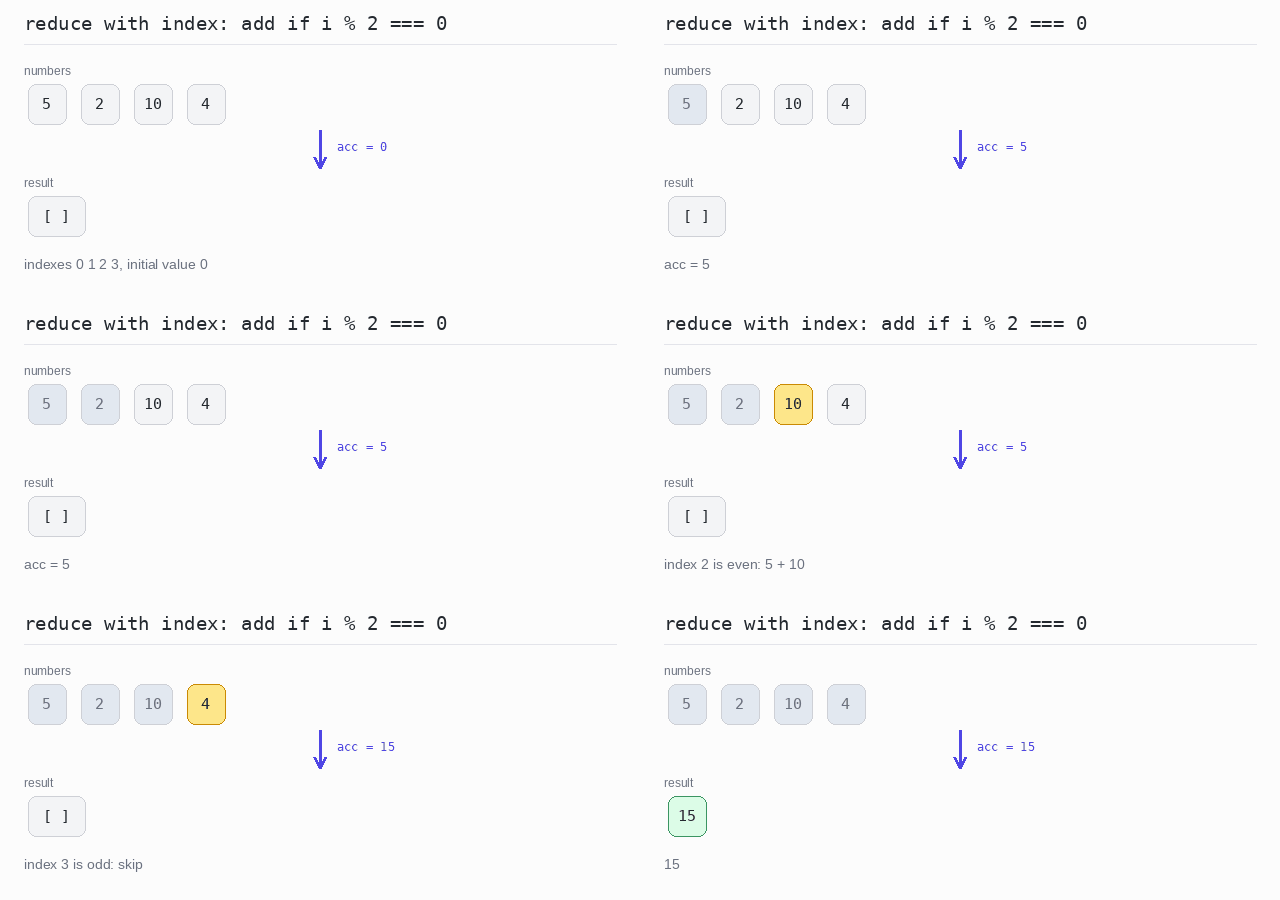
Only the elements at even indexes are added: index 0 holds 5 and index 2 holds 10, so the sum is 15.
Output: TypeScript file and captured output
const numbers = [5, 2, 10, 4]

// the third argument of the callback is the index
const sumEven = numbers.reduce((sum, element, idx) => (idx % 2 === 0 ? sum + element : sum), 0)

console.log(sumEven)
Fold with index from the right
The same rule with reduceRight(). The callback sees index 3 first and index 0 last, and the result is still 15.
Output: TypeScript file and captured output
const numbers = [5, 2, 10, 4]

// reduceRight() counts the same indexes, it only visits them from the end
const sumEven = numbers.reduceRight((sum, element, idx) => (idx % 2 === 0 ? sum + element : sum), 0)

console.log(sumEven)
Safe Reduce
reduce() without an initial value needs a first element to start with. On an empty array it throws a TypeError and stops the program.
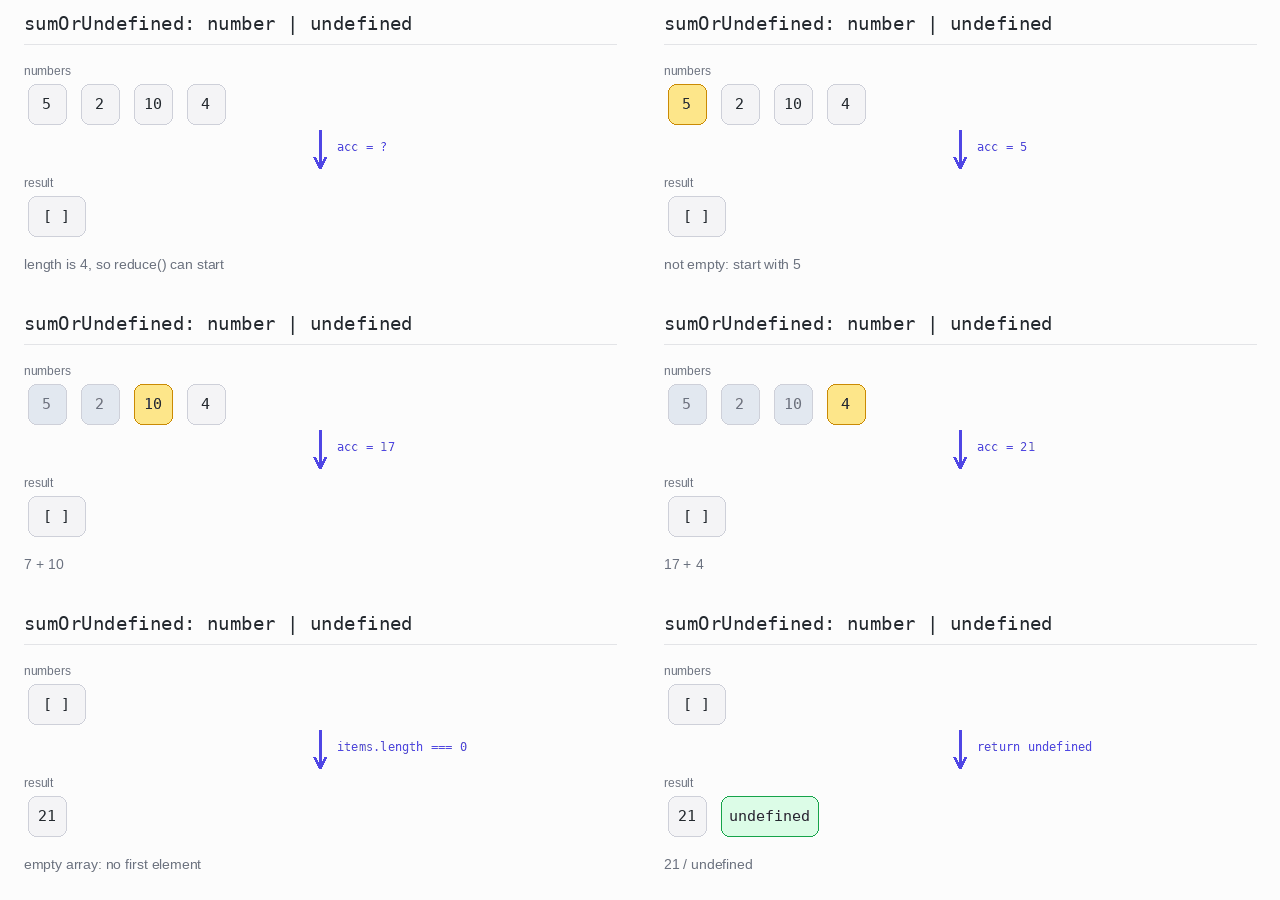
One way out is an initial value. The other is to say "there is no result" honestly: check the length first and return undefined. The return type is then number | undefined, which makes the caller think about the empty case, and ?? puts a fallback value in place of undefined in one step.
Reduce that can return undefined
sumOrUndefined() returns 21 for the numbers 5, 2, 10 and 4, and undefined for an empty array. sumOrUndefined(empty) ?? 0 turns that undefined into 0.
Output: TypeScript file and captured output
// sumOrUndefined answers undefined instead of throwing on an empty array.
function sumOrUndefined(items: number[]): number | undefined {
  if (items.length === 0) return undefined
  return items.reduce((sum, element) => sum + element)
}

const numbers = [5, 2, 10, 4]
const empty: number[] = []

console.log(sumOrUndefined(numbers))
console.log(sumOrUndefined(empty))

// ?? puts a fallback in place of undefined
console.log(sumOrUndefined(empty) ?? 0)
Running Fold and Reduce
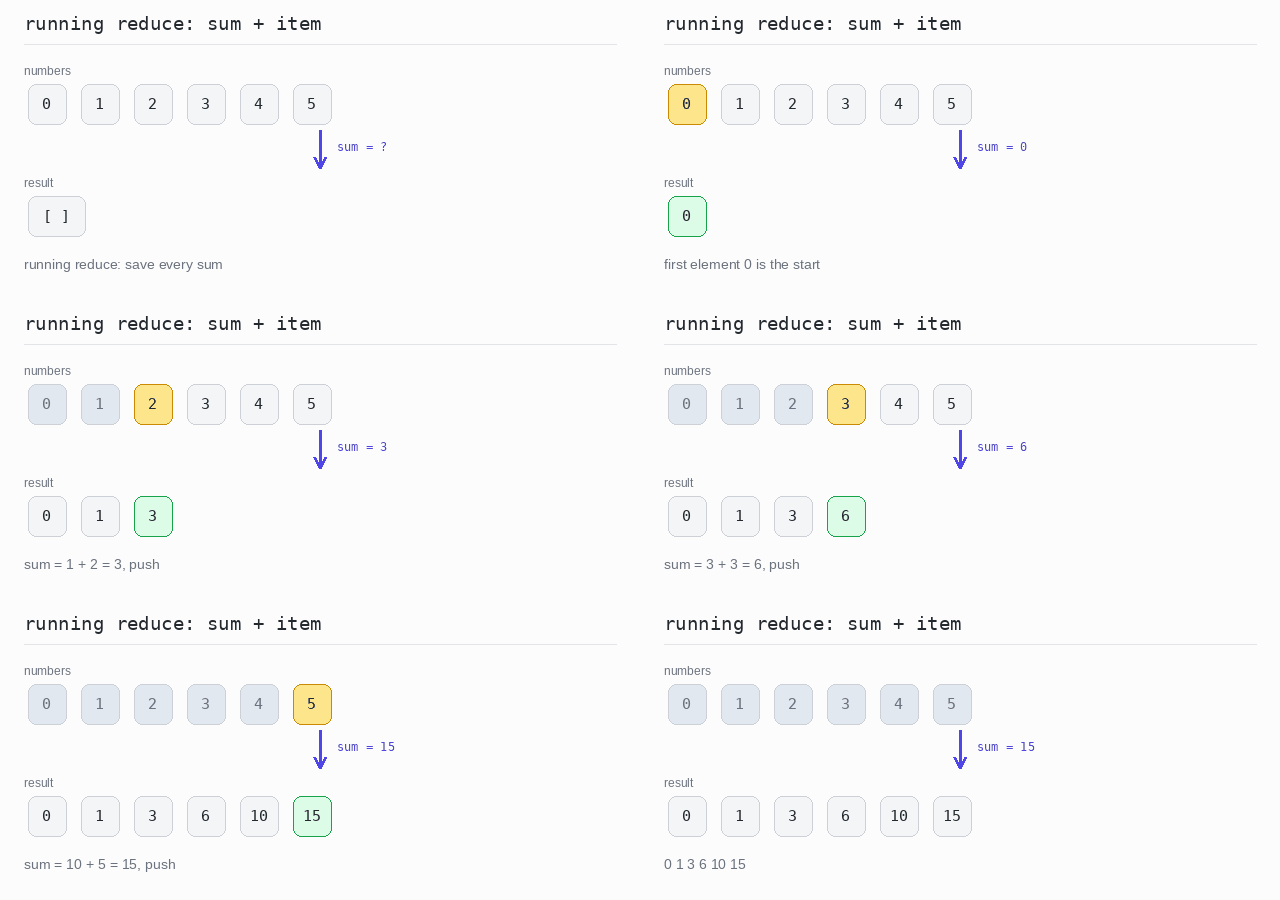
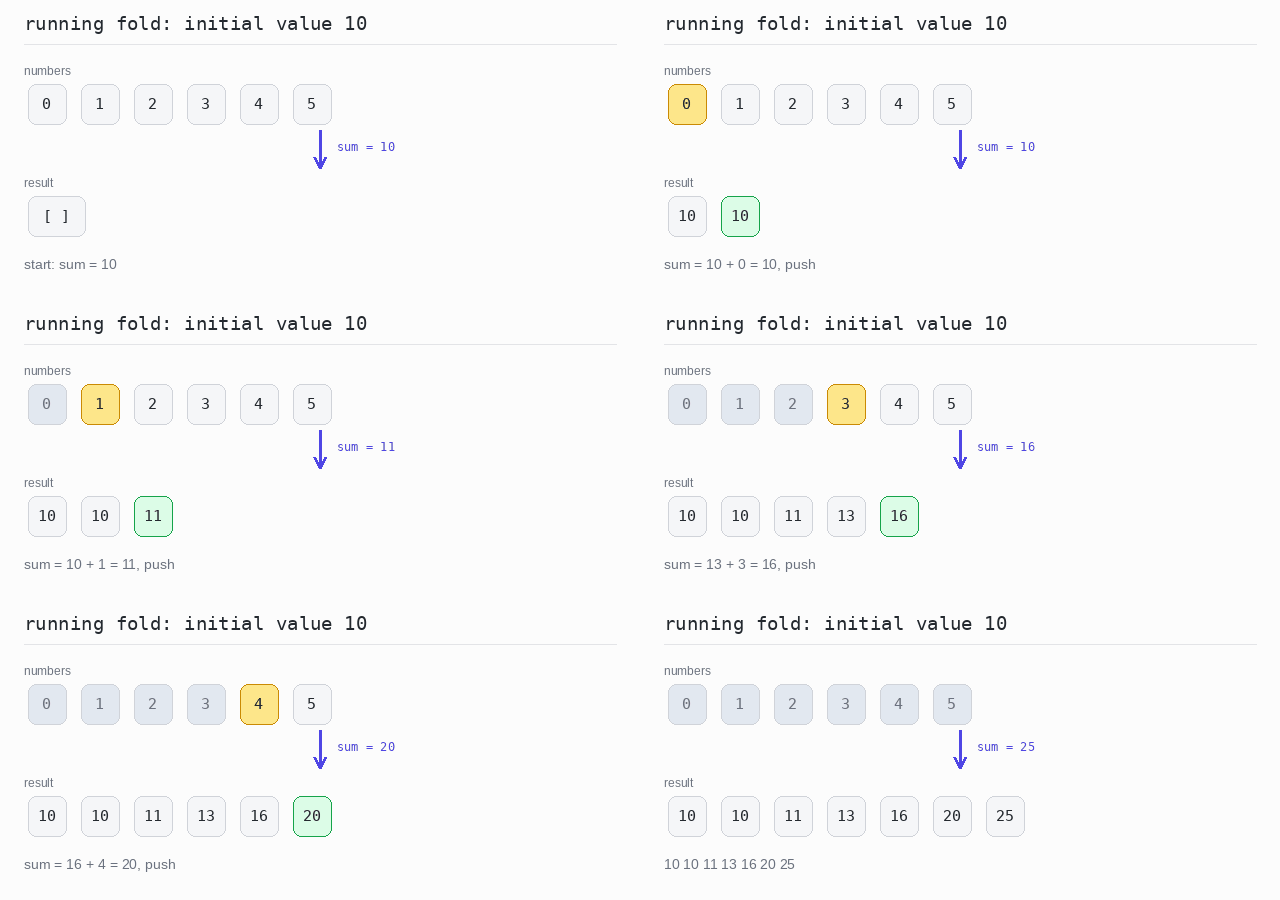
A running fold or reduce does not throw away the steps in between. It keeps the accumulator after every element, so the result is an array of all the running values.
There is no method for this. You keep a sum variable and push() it into a result array inside the loop. For a running reduce the result starts with the first element. For a running fold it starts with the initial value, so it holds one element more than the input.
Running reduce
The numbers 0 to 5 are added one by one. The result array holds every sum along the way and is printed on one line with join(' '): 0 1 3 6 10 15.
Output: TypeScript file and captured output
const numbers = [0, 1, 2, 3, 4, 5]

// the first element is the start; every later sum is kept in the result
let sum = numbers[0]
const runningReduceSum = [sum]

for (const item of numbers.slice(1)) {
  sum += item
  runningReduceSum.push(sum)
}

console.log(runningReduceSum.join(' '))
Running fold
The same with the initial value 10. The result begins with 10 itself and holds one element more than the input: 10 10 11 13 16 20 25.
Output: TypeScript file and captured output
const numbers = [0, 1, 2, 3, 4, 5]

// the initial value 10 is the first element of the result
let sum = 10
const runningFoldSum = [sum]

for (const item of numbers) {
  sum += item
  runningFoldSum.push(sum)
}

console.log(runningFoldSum.join(' '))