One Test, Many Cases
Most functions need the same check for many inputs: normal values, negative values, zero, edge cases. Copying the test five times makes five places to maintain.
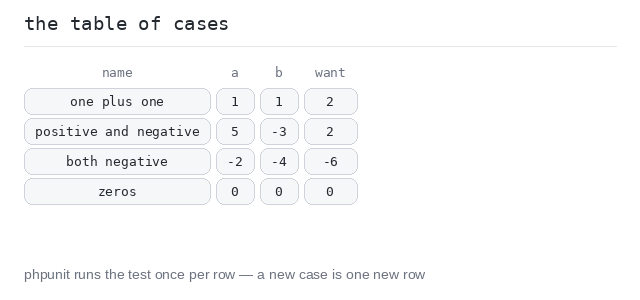
The PHPUnit way is a data provider: put the cases into one table — each row holds a name, the inputs and the expected output — and let the runner call one test method once per row.
Adding a new case becomes one new row in the table. This is the most common test pattern you will see in real PHPUnit code.
The Data Provider
The provider is a public static method that returns the table: an array of rows, keyed by the case name. The test method takes a row's values as parameters and is linked to the provider by the #[DataProvider('addCases')] attribute (imported from PHPUnit\Framework\Attributes).
PHPUnit calls the method once per row, and every row counts as its own test — a broken row fails alone, so every broken case shows up, not just the first.
Four cases in one table
Four rows, one test method, one assertion. All pass — the summary says OK (4 tests, 4 assertions). To test a fifth situation you would add one row to the table — the method stays untouched.
Output: PHP script
<?php

use PHPUnit\Framework\TestCase;
use PHPUnit\Framework\Attributes\DataProvider;

function add(int $a, int $b): int {
  return $a + $b;
}

final class AddTest extends TestCase {
  public static function addCases(): array {
    return [
      "one plus one" => [1, 1, 2],
      "positive and negative" => [5, -3, 2],
      "both negative" => [-2, -4, -6],
      "zeros" => [0, 0, 0],
    ];
  }

  #[DataProvider('addCases')]
  public function testAdd(int $a, int $b, int $want): void {
    $this->assertSame($want, add($a, $b));
  }
}
Named Cases with --testdox
--testdox shows what the rows did: every case appears with its data set name, like Add with data set "both negative".
Each row passes or fails on its own, which makes a broken case easy to spot in a long table.
Every case gets a name
The same table, run with --testdox. The output now lists all four cases separately — you can see exactly which cases ran and passed.
Output: PHP script
<?php

use PHPUnit\Framework\TestCase;
use PHPUnit\Framework\Attributes\DataProvider;

function add(int $a, int $b): int {
  return $a + $b;
}

final class AddTest extends TestCase {
  public static function addCases(): array {
    return [
      "one plus one" => [1, 1, 2],
      "positive and negative" => [5, -3, 2],
      "both negative" => [-2, -4, -6],
      "zeros" => [0, 0, 0],
    ];
  }

  #[DataProvider('addCases')]
  public function testAdd(int $a, int $b, int $want): void {
    $this->assertSame($want, add($a, $b));
  }
}
Run One Case Alone
Cases can be selected from the command line with --filter, using the data set name in quotes:
./vendor/bin/phpunit --testdox --filter '"both negative"' AddTest.php
Only the matching case runs. This is perfect while fixing one broken case: rerun just that case until it is green, then run everything again.
Filter one data set
The same file as above, run with --filter '"both negative"'. Only one of the four cases executes — the others are not even started: the summary says OK (1 test, 1 assertion).
Output: PHP script
<?php

use PHPUnit\Framework\TestCase;
use PHPUnit\Framework\Attributes\DataProvider;

function add(int $a, int $b): int {
  return $a + $b;
}

final class AddTest extends TestCase {
  public static function addCases(): array {
    return [
      "one plus one" => [1, 1, 2],
      "positive and negative" => [5, -3, 2],
      "both negative" => [-2, -4, -6],
      "zeros" => [0, 0, 0],
    ];
  }

  #[DataProvider('addCases')]
  public function testAdd(int $a, int $b, int $want): void {
    $this->assertSame($want, add($a, $b));
  }
}